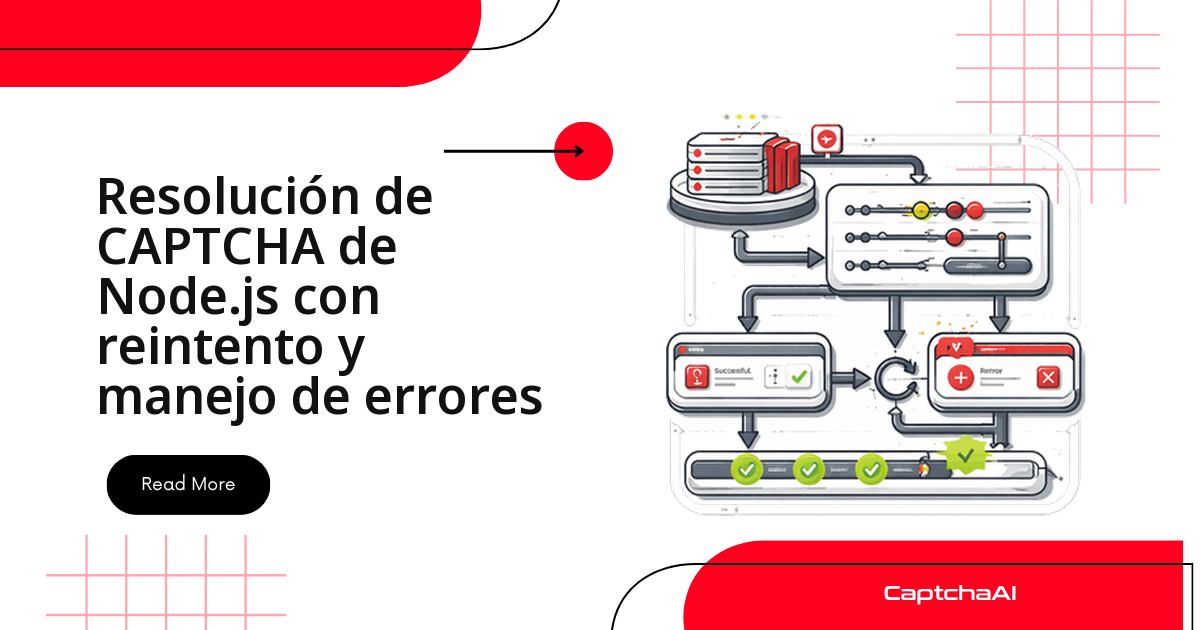
La diferencia entre un cliente de resolución de CAPTCHA que aguanta en producción y uno que se cae a la primera está en cómo trata cada fallo. Un ERROR_ZERO_BALANCE no se arregla reintentando: hay que recargar saldo. Un ERROR_NO_SLOT_AVAILABLE, en cambio, casi siempre desaparece si esperas un par de segundos. Este tutorial construye, pieza a pieza, un cliente de Node.js sobre la API de CaptchaAI que clasifica los errores, aplica retroceso exponencial, se corta solo con un disyuntor cuando la API no responde y cachea los tokens antes de que caduquen.
Cada bloque funciona por sí mismo y al final los combinamos en un patrón de producción.
Clasifica los errores antes de reintentar
El primer paso es no tratar todos los fallos igual: hay recuperables, que merecen otro intento, y fatales, que no se arreglan por insistir. Separarlos evita quemar saldo reintentando un CAPTCHA que nunca se va a resolver.
const RETRIABLE_ERRORS = new Set([
  "ERROR_NO_SLOT_AVAILABLE",
  "CAPCHA_NOT_READY",
]);

const FATAL_ERRORS = new Set([
  "ERROR_WRONG_USER_KEY",
  "ERROR_KEY_DOES_NOT_EXIST",
  "ERROR_ZERO_BALANCE",
  "ERROR_CAPTCHA_UNSOLVABLE",
  "ERROR_BAD_DUPLICATES",
  "ERROR_BAD_PARAMETERS",
  "ERROR_WRONG_CAPTCHA_ID",
]);

class CaptchaError extends Error {
  constructor(code, message) {
    super(message || code);
    this.name = "CaptchaError";
    this.code = code;
  }
}

class RetriableError extends CaptchaError {
  constructor(code) {
    super(code, `Retriable: ${code}`);
    this.name = "RetriableError";
  }
}

class FatalError extends CaptchaError {
  constructor(code) {
    super(code, `Fatal: ${code}`);
    this.name = "FatalError";
  }
}

function classifyError(code) {
  if (FATAL_ERRORS.has(code)) throw new FatalError(code);
  throw new RetriableError(code);
}
Con esta jerarquía, el resto del código solo pregunta error instanceof FatalError para saber si vale la pena reintentar.
Retroceso exponencial con jitter
Reintentar de inmediato satura la API justo cuando está bajo presión. El retroceso exponencial hace que cada intento espere el doble que el anterior, con un tope máximo; el jitter (variación aleatoria) desincroniza a varios workers para que no golpeen el endpoint a la vez.
function sleep(ms) {
  return new Promise((r) => setTimeout(r, ms));
}

async function withRetry(fn, options = {}) {
  const {
    maxRetries = 3,
    baseDelay = 2000,
    maxDelay = 30000,
    jitter = true,
  } = options;

  let lastError;

  for (let attempt = 0; attempt <= maxRetries; attempt++) {
    try {
      return await fn();
    } catch (error) {
      if (error instanceof FatalError) throw error;

      lastError = error;

      if (attempt < maxRetries) {
        let delay = Math.min(baseDelay * Math.pow(2, attempt), maxDelay);
        if (jitter) delay *= 0.5 + Math.random();
        console.log(
          `Retry ${attempt + 1}/${maxRetries} in ${(delay / 1000).toFixed(1)}s: ${error.message}`
        );
        await sleep(delay);
      }
    }
  }

  throw lastError;
}
Un FatalError corta el bucle al instante: no tiene sentido esperar 8 segundos para reintentar una clave API incorrecta.
Un solver robusto con envío y sondeo
Este es el núcleo del cliente. Envía la tarea a in.php, recibe un identificador y consulta el resultado en res.php hasta que esté listo o se agote el tiempo de espera. Tanto el envío como el sondeo tienen su propia lógica de reintento para errores transitorios de red.
const API_KEY = "YOUR_API_KEY";

class RobustSolver {
  #apiKey;
  #maxRetries;
  #pollInterval;
  #maxPollTime;

  constructor(apiKey, options = {}) {
    this.#apiKey = apiKey;
    this.#maxRetries = options.maxRetries ?? 3;
    this.#pollInterval = options.pollInterval ?? 5000;
    this.#maxPollTime = options.maxPollTime ?? 150000;
  }

  async solve(method, params) {
    return withRetry(
      () => this.#doSolve(method, params),
      { maxRetries: this.#maxRetries }
    );
  }

  async #doSolve(method, params) {
    const taskId = await this.#submit(method, params);
    return await this.#poll(taskId);
  }

  async #submit(method, params) {
    for (let attempt = 0; attempt <= this.#maxRetries; attempt++) {
      try {
        const resp = await fetch("https://ocr.captchaai.com/in.php", {
          method: "POST",
          body: new URLSearchParams({
            key: this.#apiKey,
            method,
            json: "1",
            ...params,
          }),
          signal: AbortSignal.timeout(30000),
        });

        if (!resp.ok) {
          throw new RetriableError(`HTTP_${resp.status}`);
        }

        const data = await resp.json();

        if (data.status === 1) return data.request;

        if (data.request === "ERROR_NO_SLOT_AVAILABLE") {
          if (attempt < this.#maxRetries) {
            await sleep(3000 * (attempt + 1));
            continue;
          }
        }

        classifyError(data.request);
      } catch (error) {
        if (error instanceof FatalError) throw error;
        if (error.name === "TimeoutError" || error.name === "AbortError") {
          if (attempt < this.#maxRetries) {
            await sleep(2000 * (attempt + 1));
            continue;
          }
        }
        throw error;
      }
    }
    throw new RetriableError("MAX_SUBMIT_RETRIES");
  }

  async #poll(taskId) {
    const start = Date.now();

    while (Date.now() - start < this.#maxPollTime) {
      await sleep(this.#pollInterval);

      try {
        const resp = await fetch(
          `https://ocr.captchaai.com/res.php?${new URLSearchParams({
            key: this.#apiKey,
            action: "get",
            id: taskId,
            json: "1",
          })}`,
          { signal: AbortSignal.timeout(30000) }
        );

        const data = await resp.json();

        if (data.status === 1) return data.request;
        if (data.request === "CAPCHA_NOT_READY") continue;
        if (FATAL_ERRORS.has(data.request)) throw new FatalError(data.request);
      } catch (error) {
        if (error instanceof FatalError) throw error;
        // Network errors during poll — keep trying
        continue;
      }
    }

    throw new CaptchaError("TIMEOUT", `Timed out after ${this.#maxPollTime}ms`);
  }
}
Disyuntor para cortar cuando la API no responde
Cuando la API pasa por un mal momento, seguir enviando solicitudes solo lo empeora. El disyuntor (circuit breaker) cuenta los fallos seguidos; al superar un umbral se abre y rechaza las llamadas al instante durante un tiempo, dando margen a que el servicio se recupere antes de dejar pasar una solicitud de prueba.
class CircuitBreaker {
  #state = "closed"; // closed | open | half-open
  #failures = 0;
  #lastFailure = 0;
  #threshold;
  #resetTimeout;

  constructor(threshold = 5, resetTimeout = 60000) {
    this.#threshold = threshold;
    this.#resetTimeout = resetTimeout;
  }

  get state() {
    return this.#state;
  }

  canExecute() {
    if (this.#state === "closed") return true;
    if (this.#state === "open") {
      if (Date.now() - this.#lastFailure > this.#resetTimeout) {
        this.#state = "half-open";
        return true;
      }
      return false;
    }
    return true; // half-open: allow test request
  }

  recordSuccess() {
    this.#failures = 0;
    this.#state = "closed";
  }

  recordFailure() {
    this.#failures++;
    this.#lastFailure = Date.now();
    if (this.#failures >= this.#threshold) {
      this.#state = "open";
      console.log(`Circuit OPEN — pausing for ${this.#resetTimeout / 1000}s`);
    }
  }
}

class ProtectedSolver {
  #solver;
  #breaker;

  constructor(apiKey) {
    this.#solver = new RobustSolver(apiKey);
    this.#breaker = new CircuitBreaker(5, 60000);
  }

  async solve(method, params) {
    if (!this.#breaker.canExecute()) {
      throw new CaptchaError(
        "CIRCUIT_OPEN",
        "API appears down — circuit breaker is open"
      );
    }

    try {
      const result = await this.#solver.solve(method, params);
      this.#breaker.recordSuccess();
      return result;
    } catch (error) {
      if (error instanceof FatalError) throw error;
      this.#breaker.recordFailure();
      throw error;
    }
  }

  get circuitState() {
    return this.#breaker.state;
  }
}
Los errores fatales no cuentan para abrir el disyuntor: son un problema tuyo (clave, saldo, parámetros), no una caída del servicio.
Caché de tokens antes de que caduquen
Un token de reCAPTCHA vive unos dos minutos; uno de Turnstile, alrededor de cinco. Si resuelves y tardas en usarlo, llega caducado. Esta caché reutiliza tokens dentro de su TTL y, con solveWithRetryOnReject, vuelve a resolver si el sitio de destino rechaza el token.
class TokenCache {
  #cache = new Map();
  #defaultTTL;

  constructor(defaultTTL = 110000) {
    // reCAPTCHA: ~2 min, Turnstile: ~5 min
    this.#defaultTTL = defaultTTL;
  }

  get(key) {
    const entry = this.#cache.get(key);
    if (!entry) return null;
    if (Date.now() - entry.timestamp > this.#defaultTTL) {
      this.#cache.delete(key);
      return null;
    }
    return entry.token;
  }

  set(key, token) {
    this.#cache.set(key, { token, timestamp: Date.now() });
  }

  invalidate(key) {
    this.#cache.delete(key);
  }
}

class CachedSolver {
  #solver;
  #cache;

  constructor(apiKey) {
    this.#solver = new ProtectedSolver(apiKey);
    this.#cache = new TokenCache(110000);
  }

  async getToken(cacheKey, method, params) {
    const cached = this.#cache.get(cacheKey);
    if (cached) return cached;

    const token = await this.#solver.solve(method, params);
    this.#cache.set(cacheKey, token);
    return token;
  }

  async solveWithRetryOnReject(method, params, submitFn, maxAttempts = 2) {
    for (let i = 0; i < maxAttempts; i++) {
      const token = await this.#solver.solve(method, params);
      const accepted = await submitFn(token);
      if (accepted) return token;
      console.log(`Token rejected (attempt ${i + 1}), re-solving...`);
    }
    throw new CaptchaError("TOKEN_REJECTED", "Token rejected after max attempts");
  }
}
Registro y métricas para visibilidad en producción
Sin métricas trabajas a ciegas. Esta clase acumula envíos, resueltos, fallidos y reintentos, y calcula tasa de éxito, tiempo medio de resolución y throughput por minuto: justo lo que necesitas para un panel de control o una alerta.
class SolverMetrics {
  #startTime = Date.now();
  #solveTimes = [];
  #counts = { submitted: 0, solved: 0, failed: 0, retries: 0 };

  recordSubmit() { this.#counts.submitted++; }
  recordSolved(duration) { this.#counts.solved++; this.#solveTimes.push(duration); }
  recordFailed() { this.#counts.failed++; }
  recordRetry() { this.#counts.retries++; }

  report() {
    const elapsed = (Date.now() - this.#startTime) / 1000;
    const total = this.#counts.solved + this.#counts.failed;
    const avgTime = this.#solveTimes.length > 0
      ? this.#solveTimes.reduce((a, b) => a + b, 0) / this.#solveTimes.length / 1000
      : 0;

    return {
      elapsed: `${elapsed.toFixed(0)}s`,
      submitted: this.#counts.submitted,
      solved: this.#counts.solved,
      failed: this.#counts.failed,
      retries: this.#counts.retries,
      avgSolveTime: `${avgTime.toFixed(1)}s`,
      successRate: total > 0 ? `${((this.#counts.solved / total) * 100).toFixed(1)}%` : "N/A",
      throughput: `${(this.#counts.solved / (elapsed / 60)).toFixed(1)}/min`,
    };
  }
}

class InstrumentedSolver {
  #solver;
  #metrics;

  constructor(apiKey) {
    this.#solver = new ProtectedSolver(apiKey);
    this.#metrics = new SolverMetrics();
  }

  async solve(method, params) {
    this.#metrics.recordSubmit();
    const start = Date.now();

    try {
      const token = await this.#solver.solve(method, params);
      this.#metrics.recordSolved(Date.now() - start);
      return token;
    } catch (error) {
      this.#metrics.recordFailed();
      throw error;
    }
  }

  report() {
    return this.#metrics.report();
  }
}
La successRate de aquí es la de tu propio proceso (resueltos frente a fallidos en tu entorno), no una promesa del servicio: sirve para detectar cuándo algo se degrada.
Patrón de producción completo
Ahora se juntan todas las piezas: el InstrumentedSolver envuelve al disyuntor, que envuelve al solver robusto. Con Promise.allSettled lanzamos un lote de tareas en paralelo sin que un fallo aislado tumbe al resto.
// Combine everything
const solver = new InstrumentedSolver("YOUR_API_KEY");

async function main() {
  const tasks = Array.from({ length: 10 }, (_, i) => ({
    method: "userrecaptcha",
    params: { googlekey: `KEY_${i}`, pageurl: `https://example.com/${i}` },
  }));

  const results = await Promise.allSettled(
    tasks.map((task) => solver.solve(task.method, task.params))
  );

  const solved = results.filter((r) => r.status === "fulfilled");
  const failed = results.filter((r) => r.status === "rejected");

  console.log(`Solved: ${solved.length}, Failed: ${failed.length}`);
  console.log("Metrics:", solver.report());

  for (const fail of failed) {
    console.log(`  Error: ${fail.reason.message}`);
  }
}

main();
Cuántos threads necesitas para este volumen
El lote de arriba lanza diez tareas a la vez. En CaptchaAI, esa concurrencia se paga por thread, no por resolución: un thread es un CAPTCHA en curso y, en cuanto termina, queda libre para el siguiente. Cada plan incluye resoluciones ilimitadas por thread durante el mes, sin cargos por tipo de CAPTCHA ni topes diarios.
Para una agencia en México o Argentina que factura a sus clientes en USD, esto es un costo mensual predecible en lugar de un pago por resolución que fluctúa con el volumen. Para diez tareas concurrentes como las del ejemplo, el plan BASIC ($15/mes, 5 threads) se queda corto; STANDARD ($30/mes, 15 threads) cubre ese pico. Si tu pipeline crece a cientos de resoluciones simultáneas, ADVANCE ($90/mes, 50 threads) es el siguiente escalón. Consulta los precios vigentes en captchaai.com/pricing y respeta los términos de servicio y la normativa de protección de datos aplicable.
Solución de problemas frecuentes
| Síntoma | Causa probable | Solución |
|---|---|---|
| Todos los reintentos fallan de inmediato | Se está reintentando un error fatal | Revisa la clasificación de errores |
| El disyuntor se queda abierto | API caída o clave incorrecta | Verifica el estado del servicio y tu clave API |
| El token caduca antes de usarlo | Resolución + retraso demasiado largos | Resuelve justo antes de navegar |
AbortError en fetch |
Tiempo de espera demasiado corto | Aumenta AbortSignal.timeout |
UnhandledPromiseRejection |
Falta un catch en el flujo asíncrono |
Maneja siempre los rechazos |
Preguntas frecuentes
¿Cada cuánto debo consultar res.php mientras espero el resultado?
Cada 5 segundos es un buen punto de partida, que es el pollInterval por defecto del solver. Consultar más seguido no acelera la resolución y solo suma llamadas; consultar demasiado despacio desperdicia tiempo cuando el token ya está listo.
¿En qué se diferencia el reintento del disyuntor?
El reintento actúa sobre una sola tarea: la vuelve a intentar con retroceso exponencial. El disyuntor actúa sobre todo el cliente: cuando detecta muchos fallos seguidos, deja de enviar solicitudes durante un tiempo para no golpear una API que ya está caída. Se complementan.
¿Por qué se rechaza un token que la API marcó como resuelto?
Casi siempre porque llegó caducado. Un token de reCAPTCHA dura unos dos minutos y el de Turnstile unos cinco; si tu flujo tarda más entre resolver y enviar, el sitio lo rechaza. Resuelve lo más cerca posible del envío y usa solveWithRetryOnReject para volver a resolver de forma automática.
¿Cuántos threads necesito para resolver muchos CAPTCHA en paralelo?
Tantos como resoluciones simultáneas quieras tener en vuelo: cada thread procesa un CAPTCHA a la vez y luego queda libre. Empieza con BASIC ($15/mes, 5 threads) y escala cuando tu concurrencia real lo pida.
En resumen
Un cliente de resolución de CAPTCHA en Node.js resistente con CaptchaAI se apoya en cinco piezas: clasificar los errores como recuperables o fatales, reintentar con retroceso exponencial y jitter, protegerse con un disyuntor, cachear tokens dentro de su TTL e instrumentar todo con métricas. Junta esas capas y tendrás visibilidad y estabilidad en producción sin reinventar la rueda en cada proyecto.
Artículos relacionados
Siguientes pasos
- Inicio rápido: tu primera resolución de CAPTCHA en 5 minutos
- Cómo resolver reCAPTCHA v2 con la API paso a paso
- Cómo resolver Cloudflare Turnstile con la API
- Cómo resolver GeeTest v3 con la API